
30-Second Single-Clip Generation
Render a full 30 seconds as one continuous take — no stitching, no seams, no patching shots together in post.
Seedance 2.5 limited-time offer — switch to yearly and save up to 38% per credit
Powered by Seedance · Not affiliated with ByteDance
Guide the Seedance 2.5 AI video studio with images, motion and prompts. Feed it references and the result stays consistent and fully controllable.
Stack three references — a subject, a colour palette and a setting — and Seedance 2.5 weighs all of them together into one coherent shot, not a collage.
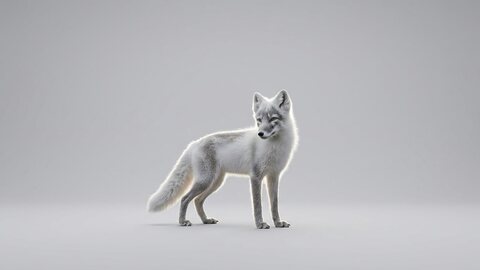
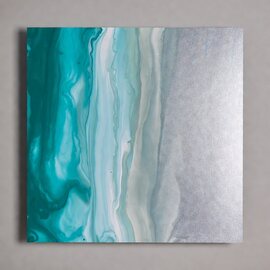

Blend the subject from @image1, the palette from @image2 and the setting from @image3 into one cinematic shot.
Three ways to create with the Seedance 2.5 AI engine — start from a text prompt, from a single image, or from a handful of reference images for full creative control.
“A neon koi fish gliding through a rain-soaked Tokyo alley at night, mirror reflections, slow cinematic dolly”
One Seedance 2.5 AI engine that covers the whole pipeline — long single takes, flexible 480p to 1080p output, and reference controls precise enough to ship.
Render a full 30 seconds as one continuous take — no stitching, no seams, no patching shots together in post.
Choose 480p for quick iterations, 720p for everyday delivery, or 1080p when the clip has to hold up on a big screen. The studio exposes the resolutions supported by the live model.
Write the scene and the action clearly and let one prompt carry it. Describe the shot, get the shot.
Bring a single still to life while keeping the subject intact. Your character and framing stay true to the source.
Feed several reference images at once for controllable, consistent results — characters, scenes and style all held in place.
Adjust a region while everything else stays consistent. Iterate freely until each take is ready to deliver.
Prompt, photo or reference — Seedance 2.5 turns each into a polished, watermark-free clip. Here’s what that looks like.
Describe the scene, the framing and the mood — Seedance 2.5 renders one continuous, cinematic take. No stitching, no jump cuts, just the shot you pictured.
Drop in a single still and watch it move — your subject, colours and composition stay intact while natural motion makes the frame feel alive. Perfect for ads, product shots and social.
Feed up to 30 reference images to pin a character, style and continuity — your subject stays consistent shot after shot, even as the scene changes around it.
From a single prompt to a finished clip — the Seedance 2.5 AI video studio keeps the workflow short so you can go from idea to motion in minutes.
Describe the subject, the action, the camera move and the look you want. The more specific you are, the closer the first render lands.

Upload an image or feed a set of reference images to lock in style, character and continuity across every shot.
Get your clip in a single pass — then download it, or edit just one region without re-rendering the whole frame.
From a feature pre-vis to a daily social drop, Seedance 2.5 AI covers the whole pipeline — text or image in, finished motion out, no shoot required.
Block out scenes before a single camera rolls. Turn scripts into moving storyboards and test shot ideas while everything is still cheap to change.
Spin up on-brand video for every channel in one pass — animate a hero product, A/B fresh creative and ship a full campaign without a shoot.
Feed the feed without burning out. Native 9:16 clips render ready for TikTok, Reels and Shorts — post daily without touching an editing timeline.
Make every listing move. Drop a product still and get clean showcase loops, lifestyle scenes and launch teasers that keep your catalogue consistent.
Explore a look before you commit. Pull a stack of reference images to lock a style, animate concept art and pin down the mood across a whole project.
Make hard ideas click. Visualize a process, narrate a lesson and build training material that learners actually watch all the way through.
A quick, honest look at where this workflow fits. Capabilities across tools shift often, so treat the rivals’ columns as a general reference, not a scorecard.
| Feature | Seedance 2.5 | Sora | Kling | Runway |
|---|---|---|---|---|
| Text-to-video workflow | Core focus | Supported | Supported | Supported |
| Image-to-video workflow | Core focus | Supported | Supported | Supported |
| 30-second single clip | Supported | — | — | — |
| Current API resolution | 480p / 720p / 1080p | — | — | — |
| Up to 30 reference images | Supported | — | — | — |
| Reference-guided editing | Strong fit | — | — | — |
| Commercial & ad concepts | Good fit | Good fit | Good fit | Good fit |
Comparison based on publicly described capabilities and intended for general reference only. Feature sets, limits and output quality vary by plan and update across every tool.
Everything the Seedance 2.5 AI model ships with — resolution, length, formats and controls — laid out so you know exactly what you can make.
480p · 720p · 1080p
Choose the current model-supported resolution for faster tests or sharper final output.
Up to 30s
One native take — a continuous shot, never stitched from clips.
16:9 · 9:16 · 1:1
Frame for cinema, vertical feeds or square posts in one click.
Up to 30 images
Feed up to 30 reference images for tighter creative control.
Text + image + refs
Start from a prompt, a single still, or a stack of references.
Reference-guided
Edit a region with visual context while the rest stays consistent.
10-bit
Smooth gradients and rich tones with no banding across the frame.
Text · Image · Reference
Three ways to create, all powered by the same engine.
MP4
Download a ready-to-share file that works everywhere you post.
Pay per render
No forced subscription — only spend credits on the clips you actually make.
From a solo creator’s first upload to a full agency pipeline, one model bends to the way each team already works.

Spin up motion-first ad concepts and seasonal campaign cuts before the brief is even signed off — then iterate in minutes, not days.

Turn a single idea into scroll-stopping vertical clips for every channel, with no watermark and no forced subscription, ready to publish.

Show a product in motion straight from a still photo — animate hero shots and feature reveals to pressure-test ideas with the team.
Explore looks fast — paint a mood with a stack of reference images and watch Seedance 2.5 hold the style consistently across every frame.

Walk into the pitch with finished-looking 720p previews. Render fresh directions overnight and react to client notes the same day.

Make abstract ideas click. Generate clear explainer visuals and learning clips that bring a lesson to life without a production crew.
From a solo creator’s first upload to an agency’s daily pipeline — here’s how teams put one prompt to work.
We swapped a full shoot day for one prompt. I dropped in our hero product photo and got a 16:9 and a 9:16 master in a single pass — no watermark, good enough to ship as-is.

The single take is the real thing — no stitch seams to hide. I batch a week of shorts in one afternoon now instead of living in an editing timeline.
I block out whole scenes before anyone picks up a camera. Reference control keeps my character consistent shot to shot — nothing else held identity this cleanly.

One product still in, a clean showcase loop out. My listings actually move now, and the whole setup took me about ten minutes on a Tuesday night.

I pin a mood with a few reference images and it holds that style across every frame. First model I’ve used that actually respects an art direction instead of fighting it.

My explainer clips used to need a freelancer and a week. Now I describe the idea and get a usable visual the same day — and students watch them all the way through.

Every plan includes 480p, 720p and 1080p video generation up to 30 seconds, no watermark, and a commercial-use license. Usage is measured in credits — failed renders are refunded automatically.
Billed annually — $83.88/yr · 38% less per credit than monthly
Billed annually — $191.88/yr · 33% less per credit than monthly
Billed annually — $359.88/yr · 38% less per credit than monthly
One-time purchase — no subscription and credits never expire. Capacity varies with resolution, duration, and reference inputs.
Everything you need to know about Seedance 2.5 AI — what it makes, how it works, and what you get when you start.
Seedance 2.5 is an available AI video model for turning a prompt, a starting frame, or multimodal references into a coherent shot. Choose Seedance 2.5 in the studio to generate through the live KIE connection now.
Yes — Seedance 2.5 is designed to render up to 30 seconds as a single native take, not a montage of short clips spliced together. That means motion, lighting and camera moves stay coherent from the first frame to the last, with no visible cuts or stitch seams.
The current Seedance 2.5 API tops out at 1080p, and the studio offers 480p, 720p and 1080p. It shows only what the live endpoint can actually deliver, so there is no 4K setting to pick. One note on 1080p: it comes back as HEVC (H.265) rather than H.264, which a few browsers cannot play inline — the watermark-free MP4 download works either way.
Seedance 2.5 accepts up to 30 reference images, plus reference video and audio. The studio applies the model-specific file and duration limits before it submits your generation.
Reference-guided editing lets you change one region of a shot — swap an outfit, fix a detail, adjust a background — without redrawing the whole frame. The surrounding context stays intact, so edits stay consistent with the rest of the video instead of looking pasted in.
Both. Start from a written prompt to describe a scene from scratch, or drop in a still and animate it while your subject, colors and composition stay true to the source. The same engine powers both modes, so you can move between them without relearning the workflow.
Your videos come out clean — nothing is stamped across your frame. You pay only for what you render, measured in credits, with no forced subscription; plans and never-expire credit packs simply unlock more generations, longer queue priority and higher limits.
Videos you generate are yours to use, including for commercial projects like ads, product clips and social content. We recommend keeping your source images and references properly licensed, and reviewing the current terms before any large-scale or branded campaign.
seedance2-5.video is an online studio for short AI videos. Type a prompt or upload a photo, and Seedance turns it into a video clip you can download.
Product ads, social media clips, storyboards and animated photos for your own projects.
Google sign-in only creates your account. We receive your name, email address and profile picture. We never access your Gmail, Drive, contacts or any other Google data.
Nudity and sexual content, intimate images of real people (AI-generated ones included), anything sexual involving minors, and putting a real person in a video without their consent. Uploads and prompts are checked before every generation, and accounts that break these rules may be closed. Read the Terms of Service
Turn a single prompt or photo into a polished HD clip in one shot — no editing timeline, no watermark, no forced subscription.